SkyView® Lite
- 4.3
- Rating
- 10.00M
- Installs
- Free
- Price
 Analysis by App-foxy
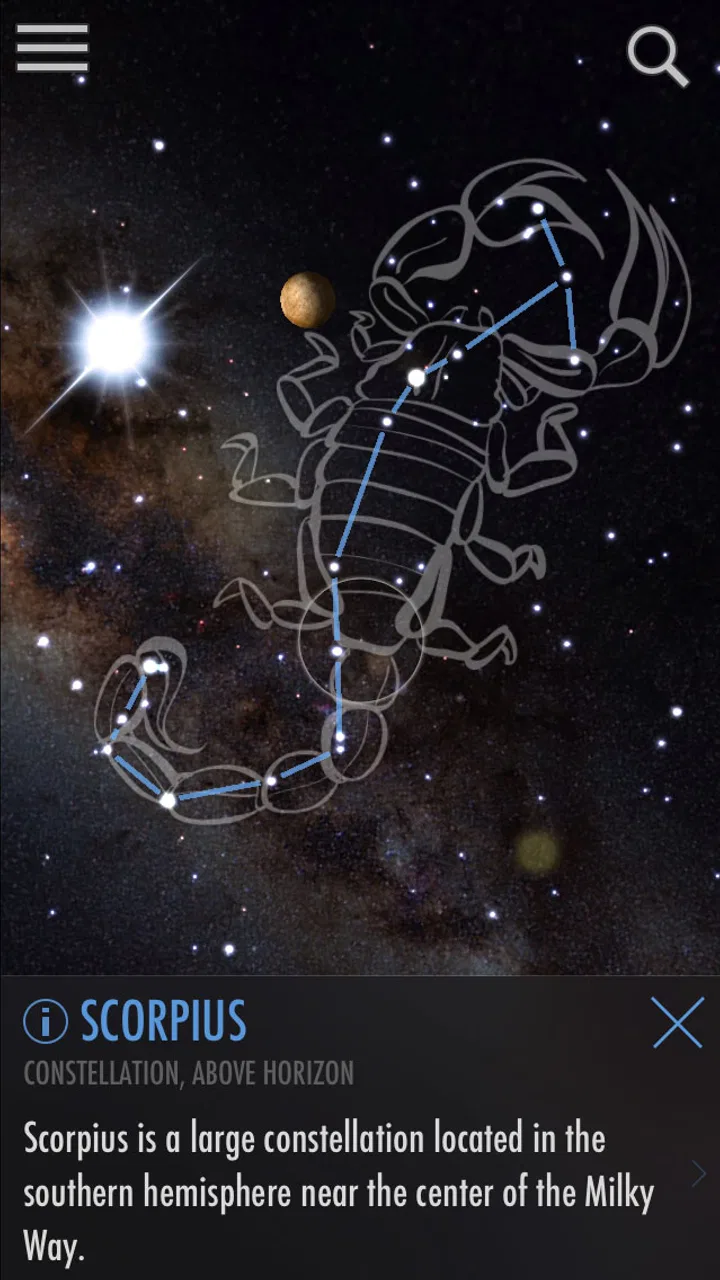
I like stargazing apps that reduce the distance between “What am I looking at?” and a useful answer. SkyView® Lite takes that approach by placing an interactive sky guide over the view from your phone. Instead of starting with a chart full of unfamiliar symbols, you can point the device upward and explore what appears in that part of the sky. That makes it approachable for a first attempt, a quiet evening outside, or a quick question from a child.
After spending time with it, I see this as a visual learning tool for casual astronomy, not a replacement for a serious observing plan. Its greatest strength is immediacy: the screen connects the sky in front of you with names and information you can investigate. Its main weakness is equally practical: the experience depends heavily on how well the phone understands its position and orientation. When that alignment is off, the app can feel wrong even when the stars themselves are exactly where they should be.
Where the experience usually gets stuck
The first hurdle is not learning astronomy; it is making the on-screen sky line up with the real one. Augmented reality depends on the phone’s sensors, and small errors become obvious when you move across the sky. If a label appears beside the object you expected rather than on it, the natural reaction is to blame the app. In practice, the problem may be the device’s orientation, the surrounding environment, or the way the phone is being held.
You May Also Like

 Blood Strike: 2.5 Anniversary
Blood Strike’s Loadouts Turn Every Drop Into a Tactical Gamble
A close look at Blood Strike’s custom loadouts: how fast access to signature weapons reshapes its battle royale rhythm, rewards preparation, and narrows the gap between fights.

 Pandora - Music & Podcasts
Pandora’s Music Is Easy to Start, but Harder to Recover
Pandora’s strength is its low-effort path from a seed to a station. Its weak spot is how much confidence it asks you to place in connection, setup, and quiet recovery.

 8 Ball Pool
 Is Built on Rivalries, Rematches, and Routine
A close look at the rivalries, rematches, shared routines, and unanswered safety questions that turn a quick pool match into a persistent mobile community.

 Samsung Music
’s Quiet Strength Is Playing What You Already Own
Its reach comes less from spectacle than from dependable access to a personal library. That simplicity is both the app’s strongest retention engine and its ceiling.

 AccuWeather: Weather Radar
AccuWeather Review: A Quick, Clear Forecast for Everyday Decisions
For everyday plans, the best forecast is the one you can understand quickly. AccuWeather makes rain timing, radar, and local conditions easy to act on, with a few trade-offs.

 Hill Climb Racing
Why Hill Climb Racing Still Turns Crashes Into One More Run
A tiny car, a bumpy hill and one more upgrade: Hill Climb Racing keeps resurfacing because its simple chaos makes every near-miss feel personal.
More From Our News Desk



I found it helpful to treat the display as a guide rather than a precision instrument. Move the phone slowly, keep the camera pointed steadily, and give the view a moment to settle before deciding that an object is missing. Fast movements make it harder to understand whether the app is catching up or whether the target is genuinely outside the current view.
Bright surroundings can also make the session confusing. In a city or near strong outdoor lighting, many stars are difficult or impossible to see with the naked eye. A label on the screen may identify something that your eyes cannot pick out. That is not necessarily a mistake; it is one of the useful distinctions the app can make between what the phone is showing and what the local sky conditions allow you to see.
Another common sticking point is expecting the app to behave like a telescope. It does not turn a phone into an optical instrument. It helps you orient yourself and learn what is in a particular area, but it cannot reveal fine surface detail that the device camera cannot capture. If your goal is close observation of planets, nebulae, or faint objects, a telescope, binoculars, or a dedicated astronomy application will be a better companion.
There is also a difference between identifying a target and understanding it. A name appearing on screen is a useful starting point, but it is not the same as a full lesson in orbital motion, seasonal visibility, or astrophotography. I recommend tapping through the information at a relaxed pace rather than trying to collect labels as quickly as possible. The educational value comes from connecting the object’s position with what you are seeing, not from filling the display with markers.
What I check before blaming the app
Before going outside, I make sure the phone is comfortable to hold and that the screen is easy to read. A loose grip encourages abrupt movements, while a dim display can make labels seem absent. I also avoid beginning beside a large metal structure or in a cramped area where turning the phone smoothly is difficult. These are simple choices, but they make the augmented view much easier to interpret.
If the app starts in an unexpected part of the sky, I first move the phone around slowly instead of repeatedly closing and reopening it. This gives me a better idea of whether the view is simply pointed elsewhere. I also check that the device is not being held at an awkward angle. A phone tilted sharply can make a familiar direction feel unfamiliar, especially when I am switching between looking at the sky and looking at the display.
For a first session, I prefer an open outdoor location with a clear view in several directions. I do not need a perfect dark-sky site to learn the interface, but an unobstructed view makes orientation less frustrating. Once I understand how the labels behave, I can use it in less ideal places and judge its results more fairly.
It is worth remembering that the app is free, which makes experimentation easy. I can try it during a short walk or share it with someone who is curious without turning the activity into a purchase decision. The Everyone content rating also suits family use, although younger users still need ordinary outdoor supervision, particularly after dark and near roads, water, or uneven ground.
Setup checks that save time outdoors
My preferred setup is deliberately simple. I open the app before beginning the observation, hold the phone upright, and let the view respond to slow movements. I avoid waving it around while asking someone else to look at the screen. Passing the phone from person to person can change the angle and make it seem as if the labels have shifted unpredictably.
If the display does not match the sky, I walk through a short recovery routine:
Stop moving the phone and look at one broad section of sky.
Turn gradually through different directions instead of making quick sweeps.
Compare several labels rather than judging the entire view from one object.
Restart the viewing attempt only after checking whether the mismatch follows the phone’s movement.
This routine is useful because it separates a temporary orientation problem from a misunderstanding of what the app is showing. If every label seems consistently displaced, I focus on the device and surroundings. If only one target is difficult to find, I consider visibility, obstructions, or the possibility that I am looking at the wrong part of the sky.
On an iPhone or iPad running at least version 10 of the operating system, the current version is 3.9.2. I would still keep the operating system and the app reasonably up to date in normal use, because compatibility and sensor behavior are easier to troubleshoot when the device is maintained. I would also start with enough battery for an outdoor session; a screen that dims or a phone that powers down halfway through a family activity is a practical failure even if the app itself is working correctly.
One useful habit is to begin with a question instead of opening the app without a plan. For example, I might ask which bright object is visible above the rooftops, or whether a recognizable constellation is in a particular direction. A focused question gives the session a purpose and makes it easier to notice whether the app is helping. It also prevents the common experience of staring at a busy display without knowing what to do next.
Recovering a session when the view goes wrong
When the alignment drifts, I do not immediately assume that the target has disappeared. I lower the phone briefly, steady my grip, and raise it again toward the same general area. Then I move in a slow arc. This is less dramatic than rapidly turning in circles, but it gives me a clearer sense of how the view is responding.
If I am showing the app to a child, I explain that the phone is helping us search, not acting as a window through which every star must be visible. That small explanation prevents disappointment when a label appears for an object hidden by clouds, haze, or city light. It also turns a technical limitation into a lesson about the difference between a digital model and direct observation.
For a group session, I prefer one person to operate the phone while everyone else looks at the same target in the real sky. After identifying it, we can pass the device around for a closer look. This avoids constant handoffs and gives the activity a natural rhythm: locate, observe, discuss, then move on. The approach works particularly well when the goal is shared curiosity rather than collecting every available label.
If closing and reopening becomes necessary, I treat that as a recovery step rather than the main method. Repeated restarts can hide the real cause of the problem, especially if the phone is being moved too quickly or the environment makes orientation difficult. A restart is reasonable when the interface clearly stops responding, but it should follow the basic checks rather than replace them.
Another practical recovery choice is to change the task. If identifying a faint object is proving difficult, I switch to a brighter, more obvious area of the sky and see whether the app behaves consistently there. That gives me a reference point. If the view works for a clear target but not for a dim one, the difficulty may be visibility rather than alignment. If nothing lines up, I return to the device and setup instead of continuing to search blindly.
When the app is not the cause
Some disappointing sessions are really weather sessions. Thin cloud, haze, glare, and a bright moon can reduce what the eyes can see, while the digital overlay continues to identify objects in the selected direction. I consider that a strength when I use it for learning, but it can feel confusing if I expect the camera view to look like a telescope image.
Buildings and trees create a similar issue. The app can indicate what lies behind an obstruction, but I cannot observe it directly from that location. Walking a short distance to find a clearer horizon may help more than changing settings or restarting. The same applies to balconies, narrow courtyards, and streets where only a small slice of sky is visible.
Phone handling matters as well. A case, grip, or mounting position can make it awkward to point the device naturally. If the screen is being viewed from an angle while the phone is tilted, I may misread the direction even when the overlay is behaving normally. I find that holding the phone at a comfortable, repeatable angle is more useful than trying to force a perfectly flat position.
Finally, expectations can be the real source of friction. Someone looking for a detailed star atlas, observation logs, telescope control, or advanced imaging should not choose this as their only astronomy tool. The usual alternatives are more specialized: a printed planisphere is dependable and battery-free, a detailed sky map offers more control, and a telescope provides actual magnification. SkyView® Lite is better at the first step of orientation and discovery.
Who will get the most from it
I would recommend it to beginners who want an immediate way into the night sky, parents looking for a calm educational activity, and travelers who do not want to learn a full star chart before looking upward. It is also useful for people who recognize a few bright objects but want a visual prompt to build confidence. The low barrier matters here: the app turns a vague question into an invitation to point, compare, and explore.
It suits short sessions especially well. On a clear evening, I can step outside, identify a few objects, and return indoors without preparing a full observation plan. That makes it more likely to become a habit rather than an ambitious project that gets postponed. The app’s broad popularity—over ten million installs, with an average rating of 4.3 from around fifty-seven thousand ratings—also suggests that this approachable format resonates with many casual users.
I would skip it as a primary choice if I already know the sky well or need precise planning for a telescope. Experienced observers may find the visual overlay less informative than a specialized chart, particularly when they want exact coordinates, detailed catalogs, or a structured record of observations. The app can still be a friendly teaching aid, but it is not where I would build an advanced workflow.
It is also not ideal for someone who dislikes using a phone outdoors. Looking down at a bright screen can interrupt dark adaptation, and balancing the device with watching the sky is not for everyone. In that case, a simple paper chart or a guided astronomy book may create a more comfortable experience. The best tool is the one that keeps attention on the sky rather than on troubleshooting the device.
How I use it in an everyday scenario
Imagine arriving at a friend’s garden after dinner. One bright point is visible above the houses, and nobody is sure whether it is a star or a planet. I would open the app, stand where the horizon is reasonably clear, and slowly guide the phone toward that area. Once the view gives me a likely identification, I would lower the device and look again with my own eyes. That second step is important: the app starts the conversation, while direct observation keeps the experience grounded.
If the label does not line up, I would not make the group wait while I repeatedly reset everything. I would move to a clearer part of the garden, choose a brighter reference point, and see whether the view behaves consistently. If it does, I would explain that the original object may be hidden by the roofline or difficult to see through the haze. The result is still useful because we have learned how location and visibility affect stargazing.
For a child, I might turn the session into a small challenge: choose a direction, find one object, then describe what is visible without the screen. This avoids turning the app into a label-reading exercise. It also helps the child notice that the sky changes with viewpoint and conditions, while the app provides a way to ask better questions.
For a solo session, I use it as a bridge to a more traditional chart. I identify an object visually, remember its general position, and then compare that impression with a paper map or a more detailed astronomy resource later. This workflow gives me the convenience of augmented reality without expecting one lightweight tool to provide every layer of astronomical information.
What the developer and app history tell me
SkyView® Lite is developed by Terminal Eleven LLC and belongs to the education category rather than being presented as a professional observatory instrument. That positioning matches my experience: the design is most valuable when it makes an unfamiliar sky less intimidating. It encourages exploration without requiring a beginner to memorize compass directions, constellation shapes, or catalog terminology first.
The app was released on October 19, 2014, and its continued presence alongside the current version 3.9.2 gives it the feel of an established utility rather than a brand-new experiment. I would not interpret that alone as a promise that every device will behave identically, but it does make the app an easy candidate for a quick trial, especially because it costs nothing to begin.
The short name “Lite” is worth keeping in mind. I approach it as a streamlined introduction, not as a complete astronomy workstation. That expectation makes the trade-off clearer: I get an approachable visual guide, while a specialist application may offer more depth and control. Choosing between them depends less on which one is universally better and more on whether I am trying to recognize the sky or plan serious observations.
My practical verdict
SkyView® Lite works best when I use it as a patient orientation aid. The strongest results come from a steady phone, an open view, modest expectations, and a willingness to verify what the screen suggests with my own eyes. When alignment slips, slow movements and a change of location are more useful than frantic resets. When weather or buildings hide the sky, the app cannot remove those physical limits, but it can still help explain what lies in the direction I am exploring.
I would recommend downloading it if you want an easy first step into stargazing and astronomy education, particularly for short sessions or shared discovery. I would choose a paper chart, a detailed sky map, or optical equipment instead when precision, deep catalogs, or magnification are the main goals. For everyone in between, this free app offers a pleasant way to turn “What is that?” into a reason to look upward.
My final advice is to give it a fair test on a clear evening, start with one simple question, and judge the experience after checking your surroundings and handling technique. Its real value is not replacing the night sky, but helping you notice more of it. That is a focused purpose, and within that purpose, I find it genuinely useful.
FAQs for SkyView® Lite
01What is SkyView® Lite and how does it work?
SkyView® Lite is an astronomy app that allows users to explore the stars, planets, and constellations by simply pointing their device at the sky. It uses your phone’s camera and sensors to identify celestial objects in real-time, providing information about them. It's a great educational tool for stargazers of all ages.
02Is SkyView® Lite free to use, and are there any in-app purchases?
SkyView® Lite is free to download and use, offering a substantial range of features at no cost. However, it does offer in-app purchases that can enhance the experience, such as additional celestial objects and ad-free browsing. This makes it accessible for casual users, while also providing options for enthusiasts to expand their exploration.
03What are the main features of SkyView® Lite?
SkyView® Lite includes features such as night mode, augmented reality, and time travel, which allows users to see the sky at different times. It also provides detailed information about stars, planets, and satellites. The app is designed to be intuitive, making astronomy accessible and engaging for users without requiring prior knowledge.
04Does SkyView® Lite require an internet connection to function?
SkyView® Lite does not require an internet connection to function. The app uses your device’s GPS and built-in sensors to map out the sky in real-time. This offline capability makes it convenient for use in remote areas where internet access may be limited, allowing users to explore the night sky anywhere.
05Is SkyView® Lite suitable for educational purposes?
Yes, SkyView® Lite is highly suitable for educational purposes. It provides a fun, interactive way to learn about astronomy, making it ideal for students and teachers. The app offers detailed information on celestial objects, helping users understand the universe better. Its user-friendly design ensures that it can be used effectively in educational settings.
Pros
- User-friendly interface for easy navigation.
- Accurate celestial object tracking.
- Works offline without an internet connection.
- Educational features for astronomy enthusiasts.
- Visually appealing graphics and animations.
Cons
- Limited features in the free version.
- Ads can be intrusive at times.
- Requires access to the device's camera.
- Some users report occasional bugs.
- No augmented reality feature in the free version.

SkyView® Lite
Gallery